


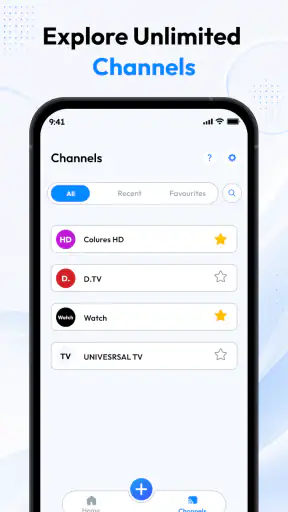
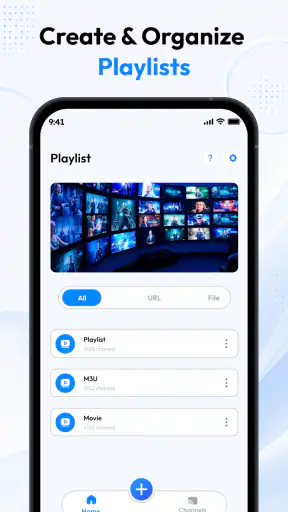
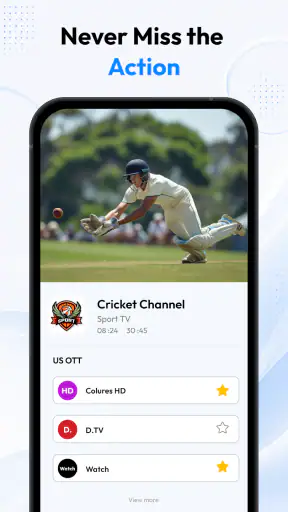
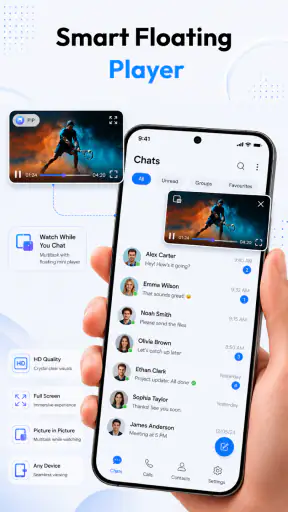
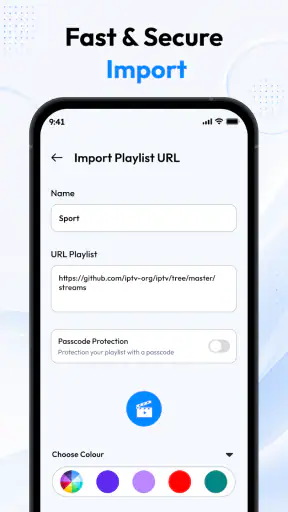
I approached Pro IPTV: Online & Live Player as a practical viewing tool rather than a complete entertainment service. Its job is to give your own IPTV playlists a place to play, with support for M3U and M3U8 sources covering movies and series. That distinction matters: the app can be useful when you already have a legitimate playlist, but it is not the same thing as a streaming subscription with a built-in catalog.
After spending time with the app, I found its appeal easy to understand. It keeps the focus on getting a playlist into a player and watching it without surrounding the experience with unnecessary editing or social features. For someone who has received an M3U file from a lawful provider, or who manages a personal list of available streams, that direct approach can be convenient. For someone expecting channels and films to appear automatically, the first step may feel less obvious.
Starting with the playlist instead of a built-in catalog
The app belongs in the video players and editors category, although its useful role is clearly playback and playlist handling. Vexora Apps presents it as a free app with an Everyone age rating, so it is positioned as an accessible option for ordinary households rather than a specialist production tool. It runs on devices using Android 8.0 or later, which gives it a reasonably broad starting point for older phones and tablets.
The most important question before installing is simple: do you already have a compatible playlist? M3U and M3U8 are playlist formats, not television services by themselves. They can point a player toward streams, but the quality, legality, organization, and reliability of those streams depend on the source. I would therefore treat this app as the front end for content you are entitled to watch, not as a promise of free channels or instant access to a movie library.
That expectation-setting is the first useful workflow tip. Before opening the player, I would keep the playlist source ready, check whether it is a file or a web address, and make sure the provider actually supports playback on the device you plan to use. This avoids blaming the app for a broken or expired source. It also makes the initial setup feel more like importing a project asset than browsing a conventional streaming service.
The store short description calls it “Pro IPTV,” but the experience is better understood through its practical role. It is a lightweight viewing surface for playlist-based television and video. If you prefer Netflix-style discovery, recommendations, profiles, and a managed catalog, a conventional subscription app will probably suit you better. If you already organize your viewing through playlists, this focused design may be exactly what you need.
What the first setup tells you
A playlist is more than a list of titles. It can contain channel names, group labels, logos, stream addresses, and other information supplied by its creator. When that information is tidy, the player can feel organized. When it is inconsistent, the experience may be harder to scan, even though the underlying streams work. This is why the quality of your source has a noticeable effect on how polished the app feels.
I recommend starting with a small, known-good playlist rather than importing a huge collection immediately. A compact list makes it easier to confirm that playback works, identify how categories are displayed, and notice whether particular streams are unavailable. Once the basic path is reliable, adding a larger source becomes less frustrating. This is a small habit, but it saves time when a playlist contains old entries or duplicate channels.
Another practical point is device choice. A phone is convenient for checking whether a stream opens, but a larger screen is usually more comfortable for long viewing sessions. The app’s value is not limited to one type of content: the same playlist approach can cover live channels, films, and series when the source is arranged that way. Still, the viewing experience will be shaped by the device, network, and stream provider as much as by the player itself.
Using it as a personal media workflow
I found it helpful to think in four stages: prepare the source, load it, test a few entries, and then settle into regular viewing. That sounds basic, but it prevents a common mistake with IPTV players: assuming that installing the app completes the setup. The app is the playback stage, while the playlist is the material being played. Keeping those roles separate makes troubleshooting much clearer.
A realistic everyday example would be a household that receives a lawful M3U8 playlist from its television provider. One person can load the source on a tablet for kitchen viewing, while another uses the same general playlist on a phone during a commute or break. If a single channel fails, the first thing I would check is whether the stream itself is available, rather than immediately reinstalling the player. That distinction helps avoid unnecessary resets.
For a film-focused user, the workflow is slightly different. I would use the playlist’s own grouping and naming to locate movies, then test a title before settling in. For series, I would pay attention to how episodes are labeled, because playlist naming conventions can vary widely. A player can open the source correctly and still leave you with confusing labels if the provider has not organized the entries carefully.
Making the viewing process work smoothly
The app’s strength is its narrow purpose. It does not ask me to build a library from scratch or learn a complicated creative suite. I bring the playlist, and the player gives that source a place to run. That makes the learning curve gentler than it would be with a full media center, especially for someone who only wants to watch channels or videos from a prepared list.
At the same time, the narrow purpose creates a trade-off. A dedicated streaming service usually controls the catalog, metadata, artwork, search, playback behavior, and support in one package. With an IPTV playlist player, those pieces are divided between the app and the source provider. The app can be straightforward, but it cannot repair missing artwork, unclear episode names, or unreliable stream addresses that originate outside it.
One of the more useful habits is to test different kinds of entries instead of checking only the first channel. I would try a live stream, a movie entry, and a series episode if all three are present. This reveals whether the playlist is consistently structured and whether the provider has supplied working links across its categories. A single successful channel does not necessarily prove that the entire list is healthy.
Network conditions also deserve attention. Live playback is sensitive to interruptions, and a stream that works perfectly on home Wi-Fi may behave differently on mobile data or a crowded public network. When playback stops, I would compare another entry from the same playlist before concluding that the app is at fault. If several unrelated entries fail together, the source or connection becomes a more likely explanation.
Where iteration matters more than the first launch
Playlist-based viewing is often an iterative process. You may begin with a source that looks promising, discover that some entries are outdated, and then replace it with a cleaner one. The app’s usefulness depends partly on how easily it fits into that cycle. I would keep a note of which source is current and avoid mixing several unmarked lists, because confusion grows quickly when similar playlists have different versions of the same channel.
A good maintenance routine is to remove or stop relying on entries that repeatedly fail, while keeping the working source identifiable. This is not glamorous, but it makes a major difference in daily use. If a family member is trying to watch a program, they should not have to search through several nearly identical entries to find the one that functions. A smaller, cleaner list can be more valuable than a massive one.
There is also a privacy-minded workflow worth considering. I would avoid sharing playlist files or source addresses casually, especially when they are tied to a paid or personal provider account. A player may make access convenient, but convenience should not turn into careless distribution. The safest approach is to use sources from providers you trust and to treat playlist details like account-related information.
For series, I would keep expectations realistic. Playlist players do not automatically guarantee the same season-and-episode navigation found in a polished on-demand service. If the source uses clear episode names, browsing may be comfortable. If it uses abbreviated or inconsistent labels, you may need to spend more time identifying the right entry. That is a genuine limitation for viewers who want a fully curated box-set experience.
Comparing it with familiar alternatives
Compared with a general-purpose video player, this app is more directly aimed at IPTV playlist use. A basic media player may handle local files exceptionally well but require extra work for M3U or M3U8 organization. Pro IPTV: Online & Live Player is more appealing when the playlist itself is the center of your viewing routine.
Compared with a full media-center application, it may feel less expansive. Media centers often combine local libraries, network storage, artwork, subtitles, plugins, and extensive customization. That can be powerful, but it also introduces setup decisions that a casual viewer may not want. I would choose this app when I value a shorter route from playlist to playback, and choose a media center when I need one interface for many different sources.
Compared with a paid streaming service, the difference is even clearer. A subscription platform usually handles content licensing, search, recommendations, watch history, and consistent presentation. This app does not replace that model; it complements a playlist-based one. The better choice depends on whether you want convenience supplied by a catalog or control over the source you load yourself.
The public response suggests that the app has found a meaningful audience: it has passed one million installs and holds a 4.1 average from around one thousand ratings. I read those figures as signs of practical interest rather than proof that every setup will work equally well. IPTV experiences vary heavily by playlist and connection, so a generally positive reception should encourage testing, not eliminate the need for sensible expectations.
Handoff from setup to everyday viewing
Once the playlist is working, the best handoff is to make the setup understandable for anyone else who will use the device. I would leave the source clearly identified, explain which entries are reliable, and show how to return to the main list after playback. This is especially useful on a shared tablet, where the person who imported the playlist may not be the person who watches it later.
For a living-room routine, I would test the app at the time of day when it will actually be used. Some streams behave differently during busy periods, and a short daytime test may not reveal evening interruptions. Testing a few channels and one on-demand entry at the intended viewing time gives a more honest picture than checking only when the network is quiet.
When a stream fails, I would use a simple handoff checklist: try another entry, verify the network, confirm that the playlist is still current, and then restart the app if necessary. This order matters because restarting cannot repair an expired link. It also helps identify whether the issue affects one title, one group, the entire source, or the device connection.
The app can be a sensible choice for people who want free software at the player stage, and its compatibility with Android 8.0 or later makes it available to users who are not running the newest hardware. Its current version is 1.0, so I would approach it as a focused tool whose long-term experience may depend on how actively the developer continues refining it. I would not choose it solely because of the “Pro” wording; I would choose it because the playlist workflow matches my needs.
There are clear situations where I would skip it. I would not recommend it to a person who wants content included automatically, expects guaranteed uptime, or needs a highly polished guide with dependable metadata. I would also steer away from it for someone who mainly plays downloaded files, because a local-media player may be more appropriate. The app makes the most sense when M3U or M3U8 playlists are already part of the user’s routine.
My creator-style verdict on the complete workflow
Although this is not a content-creation app, I judged it through the same practical lens I use for creative tools: how well does it move a user from a starting asset to a finished result? Here, the starting asset is the playlist, the making process is loading and organizing that source, iteration is replacing unreliable entries and refining the routine, and the final handoff is getting dependable playback onto the device used for viewing.
On that basis, Vexora Apps has kept the concept understandable. The app is not trying to become a full entertainment ecosystem. It gives playlist-based video a dedicated place to play, which is valuable when the user already knows where the content comes from and how that source is organized. The free price lowers the barrier to trying it, while the Everyone rating makes its general positioning easy to understand.
My main reservation is not about the idea but about the dependency chain. A player can be clean and responsive, yet the overall experience can still disappoint if the playlist is poorly maintained or the network is unstable. New users need to understand that distinction before they judge the app. In my experience, the most successful setup is a modest, legitimate playlist that has been tested on the device and kept free of outdated entries.
I would recommend Pro IPTV: Online & Live Player to someone who already has a trustworthy M3U or M3U8 source and wants a straightforward way to watch movies, series, or live programming from that list. I would not present it as a replacement for a managed streaming subscription or a feature-heavy media center. Its real strength is the direct path from a prepared playlist to playback.
With a 4.1 average and more than a million installs, it is clearly not an obscure experiment, but those figures should be read alongside the app’s focused design. It is best for users who value control over their playlist and are comfortable doing a little source management themselves. If that describes you, the app is worth trying. If you want everything curated, searchable, and guaranteed from the moment you open it, a conventional streaming alternative will be the more comfortable choice.


